Debugging
Debug Goal Menu
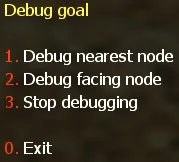
Section titled “Debug Goal Menu”To test the bots walkability to a specified node, you need to open the second page of the “Graph Editor” menu, and select 1. Debug Goal. Then a menu should appear as shown in the picture below.
| Option | Description |
|---|---|
| 1. Debug nearest node | Specify the nearest node as the goal that the bot needs to reach |
| 2. Debug facing node | Specify the facing node (which you pointed with your crosshair) as the goal that the bot needs to reach |
| 3. Stop debugging | Disable the Debug Goal functionality |